Verizon eSIM Explained: Your Phone, IMEI and EID
On this page
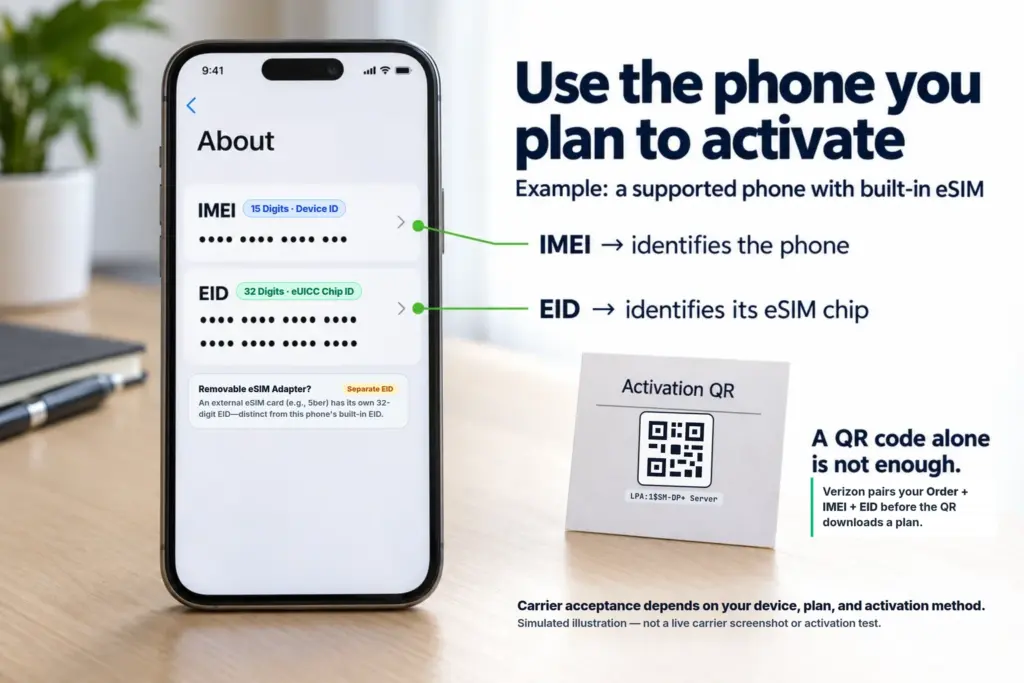
For Verizon eSIM activation on a smartphone, start with the actual compatible phone you plan to use—not just a QR code or an IMEI copied from somewhere else. The IMEI identifies the cellular device. The EID identifies the eSIM hardware receiving the plan. They describe different parts of the same setup.
That is why a Verizon activation QR code is not a universal download link for any phone or removable eSIM card. Here is what the identifiers mean, what Verizon documents, and what to check before you buy.
IMEI vs EID: what each number identifies
Picture the phone in your hand. It has cellular equipment that connects to the network. If it supports built-in eSIM, it also has secure hardware that stores downloaded SIM profiles. That hardware is called an eUICC.
- IMEI = the cellular device’s ID. It is 15 digits. Carriers use device information to check compatibility and set up service. A dual-SIM phone can have two IMEIs.
- EID = the eSIM hardware’s ID. It is 32 digits and identifies the eUICC receiving the profile. It is not your phone number.
- ICCID = the SIM/profile’s ID. For eSIM, it identifies the installed profile rather than the hardware that stores it.
| Identifier | Length / Format | What It Identifies | Role in Carrier eSIM Activation |
|---|---|---|---|
| IMEI / IMEI2 | 15 digits | The physical phone modem & SIM slot | Verifies device model compatibility, network bands, and carrier lock status |
| EID | 32 digits | The built-in eUICC chip (or removable eSIM card) | Targets the exact secure hardware chip where the carrier prepares the profile |
| ICCID | 19–20 digits | The downloaded SIM profile itself | Assigned to the active line/profile once provisioned by the carrier |
| Activation QR (LPA) | LPA:1$... string |
The carrier SM-DP+ download server address | Tells your phone’s software where to fetch a profile already staged for your EID |
Think of IMEI as answering “Which phone?” and EID as answering “Which eSIM chip?” Neither is the plan itself. The identifier formats and profile distinction are documented in GSMA TS.43, Table 75 and GSMA SGP.22.
“Matching IMEI and EID” does not mean the digits should match. It means the activation must use the appropriate device and receiving-eSIM information for the carrier’s process. Copying a supported phone’s IMEI does not make a different device—or an external adapter—that phone.
Why Verizon’s shared QR code is not enough
Verizon’s business support page confirms that its activation QR code is shared across devices and orders. The page also requires an existing service order for the documented download procedure. The code helps start installation; it does not create an order or establish device eligibility. Verizon’s business eSIM instructions explain this workflow.
There is also direct technical evidence that both identifiers matter: Verizon’s ThingSpace Consumer eSIM for Enterprise activation API requires EID and IMEI in the activation request.
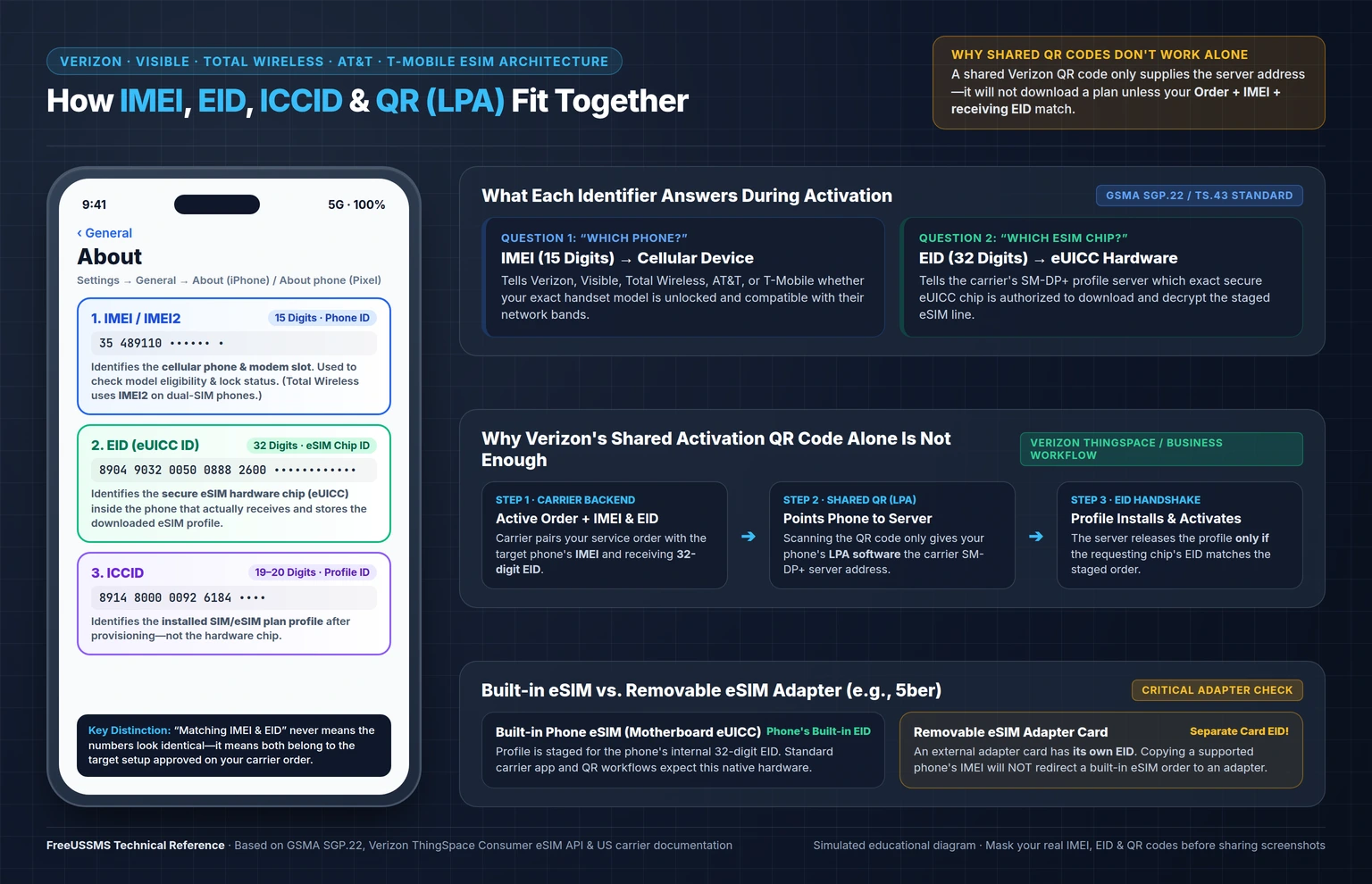
The practical rule: use a device accepted for your plan, supply the identifiers requested for that device, and download through the carrier’s supported process. Having the shared QR code alone is not confirmation that an external eSIM adapter will work. (If you are testing Verizon’s network before committing to a plan, see our step-by-step Verizon 30-Day Free Trial eSIM Guide for eligibility and app setup details.)
The API documents an enterprise workflow. It does not disclose one universal IMEI–EID validation rule covering every Verizon plan and affiliated brand.
What this means for Visible and Total Wireless
Visible: its transfer instructions tell you to use the new phone that will receive the eSIM, enter that device’s IMEI, and complete account verification. In other words, work with the phone you will actually use, not an unrelated device identifier. Visible’s transfer guide.
Total Wireless: start with its device compatibility check. Its eSIM guide instructs customers with two IMEIs to use IMEI2 for that activation process. Total Wireless eSIM instructions.
Follow the instructions for the brand selling your plan. Shared network ownership does not make every activation screen or supported-device list interchangeable.
Find the right numbers on your phone
How to find EID and IMEI on an iPhone
- Open Settings → General → About.
- Scroll to EID and IMEI. Depending on the model, you may also see IMEI2. These rows may appear at different scroll positions.
- Touch and hold the requested value to copy it into the carrier’s official activation form.
Apple’s identifier guide shows where to look. If EID is absent, check eSIM support for your exact model and regional version before proceeding.
On a Google Pixel
Open Settings → About phone to find IMEI. For EID, Google’s guide points to About phone → SIM status. Other Android brands and software versions can use different menus. Google’s Pixel identifier instructions.
IMEI or IMEI2? Use the one specified for your carrier’s activation route. Total Wireless’s IMEI2 instruction is not a rule for every device and provider.
Keep complete identifiers and activation QR codes out of public posts. When sharing a screenshot for help, cover the values, serial number and phone number; leave the field labels visible.
Can you use an external eSIM adapter with Verizon?
A removable eSIM adapter puts profile-storing hardware into a card that fits a physical SIM slot. For example, 5ber describes its card as having its own EID, with an app used to manage profiles on compatible phones.
The adapter’s EID is not the phone’s built-in EID. If a profile is intended for the built-in chip, scanning its activation code through an adapter does not automatically redirect it to the adapter.
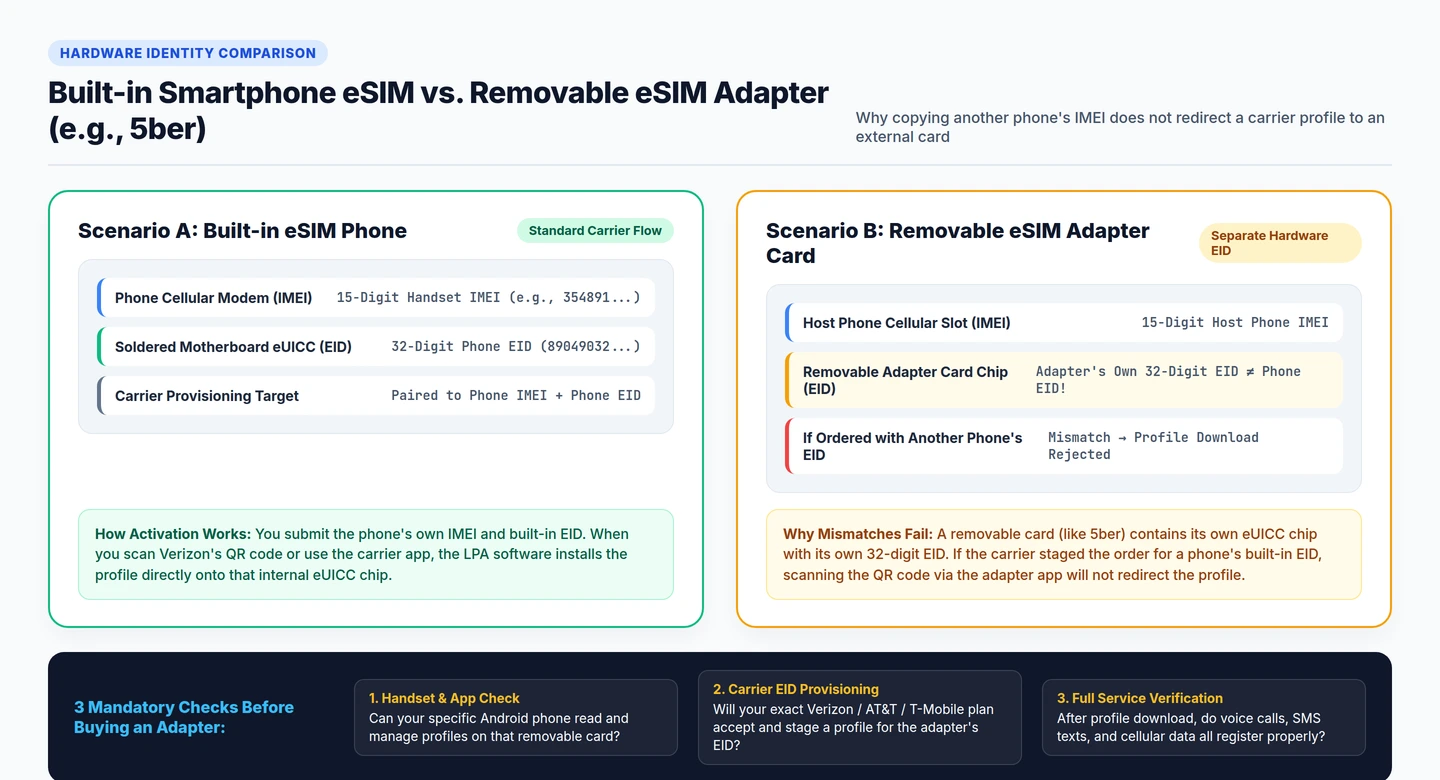
Before buying, separate three checks:
- Phone and app: can your handset manage that adapter?
- Carrier download: will your exact plan be provisioned to the adapter’s eUICC?
- Working service: after installation, do calls, SMS and data work as required?
Passing the first check does not prove the other two. Ask the carrier and adapter vendor about your exact combination before paying. This guide does not claim a successful Verizon-and-adapter activation test.
Are AT&T and T-Mobile different?
Their activation methods differ, but neither should be treated as “any eSIM card will work.”
- AT&T Prepaid: its bring-your-own-device instructions call for a compatible, unlocked device and describe an eSIM activation-card option. AT&T’s device requirements.
- T-Mobile: the “Other devices” procedure in its SIM/eSIM guide asks for the destination device’s IMEI and EID before the QR-code step. T-Mobile’s setup guide.
| Carrier / Brand | Identifiers Requested | Key Official Requirement |
|---|---|---|
| Verizon (Postpaid / Business) | IMEI + EID | Requires an active service order paired to the target device before scanning the shared QR code |
| Visible (by Verizon) | Target phone IMEI | Activation happens inside the Visible app on the actual compatible phone receiving service |
| Total Wireless | IMEI2 (on dual-SIM phones) | Requires passing the compatibility checker and entering the digital SIM slot’s IMEI2 |
| AT&T Prepaid | IMEI / EID or eSIM Card | Requires an unlocked, AT&T-compatible handset and supported eSIM provisioning route |
| T-Mobile | Destination IMEI + EID | “Other devices” setup explicitly pairs both destination IMEI and 32-digit EID prior to QR download |
A successful adapter download on one plan is useful evidence for that setup—not proof of compatibility across all plans or devices.
Verizon eSIM QR code not working? Check the stage
- Phone rejected before download: recheck the exact model, lock status, requested IMEI and carrier compatibility result.
- QR code scans, but no plan appears: ask the carrier to check the service order, intended device and receiving EID.
- Profile installs, but service fails: have the carrier check line activation, then test calls, SMS and data separately. An installed profile is not proof that all three work.
Record the error and the stage where it occurs. That gives support something more useful than “the QR code doesn’t work.”
The bottom line
Use the actual supported phone, its requested IMEI, and the EID of the hardware receiving the eSIM. A shared activation QR code does not remove those requirements. An external adapter has its own hardware identity and needs separate compatibility confirmation.
If you see the term “LPA code,” remember: the LPA is the software that downloads and manages profiles; the activation code supplies information it uses. You do not need to understand that software to follow the device checks above. Android’s eSIM overview.
Only need a US phone number for SMS verification? If your goal is simply receiving one-time verification texts (OTP) from US apps and websites rather than activating a full cellular data plan on your handset, you do not need to provision an eSIM at all—you can use our free public US SIM numbers for quick testing or reserve a dedicated line via private non-VoIP US SIM rentals.
About this guide: By FreeUSSMS Team. Prepared with AI-assisted research and drafting from the linked official documentation, checked October 18, 2026. No hands-on carrier activation was performed. The cover and inline diagrams are simulated educational illustrations. FreeUSSMS operates this website and is independent of the companies discussed; its web-based SMS inbox service does not install an eSIM on your phone.
Updated Oct 27, 2026