Virtual Number Not Receiving SMS? Read This Before Trying Another One
On this page
You enter your number. Click “Send code.” Open the inbox.
Nothing.
You wait a minute. Refresh. Check that you copied the number correctly. Hit resend when the timer finally lets you.
Still nothing.
At some point, you start wondering whether you missed a step. Maybe the number is broken. Maybe you need to pay for the upgrade. Maybe another app will work.
That is a frustrating amount of effort for something that was supposed to take thirty seconds.
If your virtual number is not receiving SMS verification codes, there is one thing worth checking before you spend more time—or money: does the website accept that type of number at all?
Some websites explicitly do not accept VoIP numbers for verification. When that restriction applies, waiting longer or requesting another code will not make the number eligible. You can enter everything correctly and still be using a number the service does not support.
A number can receive texts and still be rejected for verification
This is the part that catches people out.
You have a working US number. It has the right country code. You might even have received ordinary messages on it. Naturally, you expect a verification text to work too.
But the ability to receive SMS and a website’s willingness to send verification codes to that number are separate things.
For example, Microsoft’s account support documentation explicitly says VoIP numbers cannot be used to sign in or receive verification codes, and directs users to add a mobile phone number instead. That is a number-type restriction, not a suggestion to keep refreshing the inbox. You can check Microsoft’s verification-code guidance directly.
“Virtual number” is also a broad label. What matters is the underlying number type and what the sending service allows—not simply whether you read the message in an app, on a phone, or in a browser.
That distinction can save you a lot of pointless troubleshooting. If the service accepts your number type but messages still do not appear, our SMS troubleshooting checklist covers the next checks.
Paying for an upgrade does not automatically solve that problem
It is understandable to assume that a paid number will work better. When you see an upgrade offering verification codes, paying can feel like the obvious next step.
But there are two different questions:
- Does your number provider allow you to receive verification messages?
- Does the website sending the message accept your number?
An upgrade may address the first question without changing the answer to the second.
TextNow’s own documentation explains that some services do not support its numbers for verification or two-factor authentication—even in its troubleshooting advice for subscribers.
That is what makes the experience so annoying. You can spend money and still end up staring at the same empty inbox.
Before purchasing another number or subscription, check the sending service’s requirements. If it explicitly excludes VoIP numbers, buying another VoIP number leaves that requirement unresolved.
Try a real US mobile number without buying one
Sometimes you only need to receive a message for a temporary task. Buying a number or starting a recurring subscription can feel excessive—especially before you know whether the service accepts it.
This is the practical problem FreeUSSMS is built to help with.
FreeUSSMS provides US mobile numbers backed by real physical SIM cards, with incoming messages available online for free.
You do not need to buy the SIM card, insert it into your own phone, or pay a subscription to read the public inbox. You choose an available number, copy it, and open its messages in your browser.
The physical SIM is on our side. The inbox is on your screen.
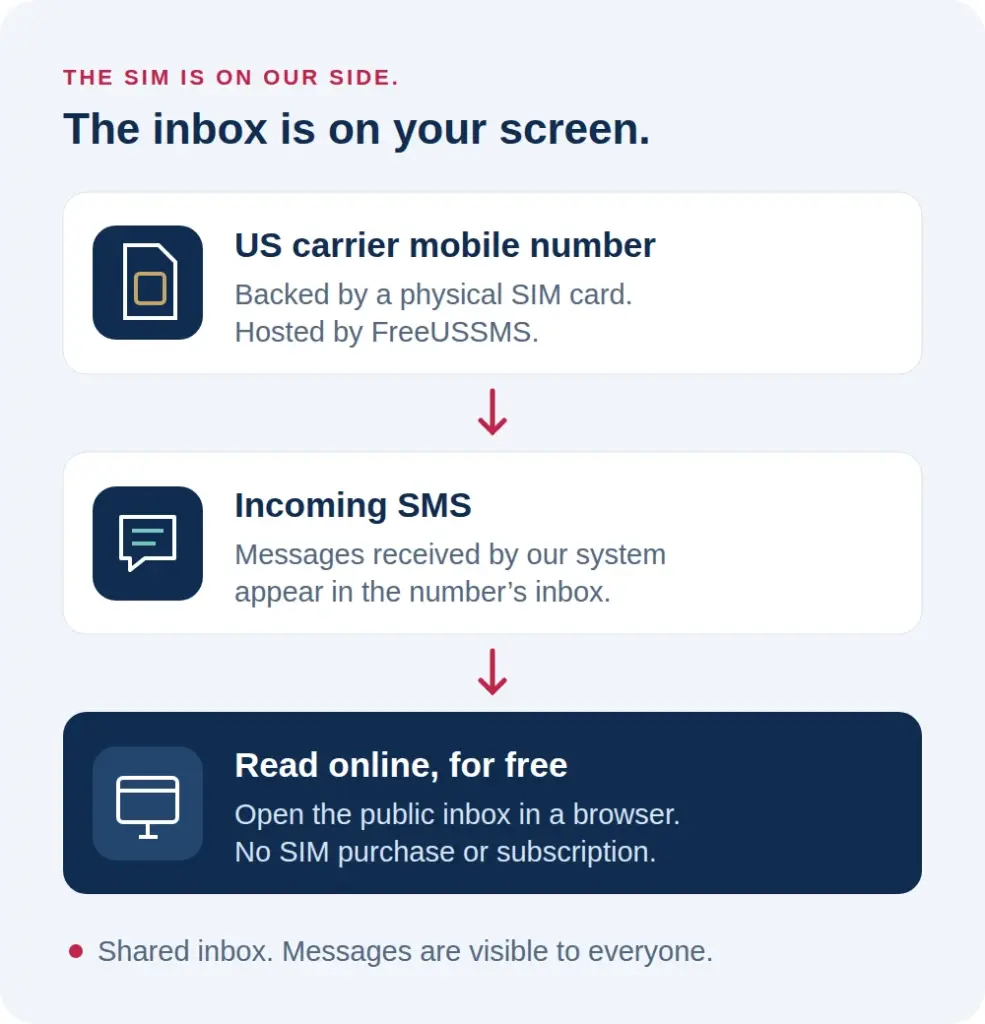
That gives you access to a different kind of number from a VoIP line, without having to purchase a number just to try receiving an SMS.
The value is straightforward: less setup, no number purchase, and a clear place to check incoming messages.
What we checked on FreeUSSMS
Website check: 2026-10-04. In automated browser checks, we opened a currently listed number and confirmed that its existing public messages loaded automatically. The checked inbox did not require an extra reveal button or a human-verification step.
This verifies the path from choosing a number to reading messages already on our website. We did not register a third-party account or request a new verification SMS as part of this check. It therefore does not establish an outside service’s compatibility, delivery speed, or success rate. A service name appearing in a public message is not a controlled compatibility test.
A real SIM number can still be shared
We want this to be clear before you use one.
FreeUSSMS numbers are backed by physical SIM cards, but their inboxes are public. Other visitors can read the messages, and choosing a number does not reserve it for you.
That makes them an option for temporary, non-sensitive uses where the service permits shared numbers. It also means they are unsuitable for your main email account, banking, business account recovery, or anything you need to keep private and control over time.
For those accounts, use a number you personally own and maintain. Our guide to public and private phone numbers explains the difference.
Likewise, a physical SIM number does not promise acceptance by every website. It addresses the distinction between a VoIP line and a carrier mobile number; the website’s other number requirements still apply.
Knowing those limits upfront is part of a useful service. You should not have to discover them after relying on a number.
Before you spend another twenty minutes waiting
Check whether the website accepts VoIP numbers. If it clearly requires a mobile number, take that requirement seriously instead of cycling through more numbers of the same unsupported type.
Then decide whether you need a private number you will keep, or simply a public inbox for a permitted temporary use.
If a free, public US mobile inbox fits your task, you can browse the available numbers on FreeUSSMS, choose one, and check its messages. If you are new here, our quick getting-started guide walks you through it.
You came for a text message. You deserve to understand why it is not arriving—and what your next option actually offers—before giving another service your time or money.